Who May Use Ill?
- Customers with a valid Rochester Public Library [RPL] card or other Minnesota library card registered at RPL may request interlibrary loan materials with some exceptions.
- Rochester residents without library cards must register for a library card before making interlibrary loan requests.
- Library users with cards from other Minnesota libraries may request RPL materials for delivery to their home library through MNLINK. To use MNLINK, the library user must have a valid library card (not delinquent due to fines, expiration, etc.) from their home library.
Is There A Limit On Ill Loans?
- The MNLINK interlibrary loan system limits RPL borrowers to 5 active requests, which includes pending requests and received requests.
What Materials Are Available?
- Video & board games as well as AV equipment are not requestable.
- New titles (published within the last two years) are generally considered for purchase at RPL, instead of requesting from another library. For recently published materials, use the Recommend a Purchase form instead of placing an interlibrary loan request
- If we own a copy of the requested title, but it is currently checked out, requests will be put on the waiting list for the RPL copy
- Reference and genealogy books (family and local histories) are generally not available to borrow from other libraries.
- Online and electronic titles (such as eBooks) cannot be borrowed from other libraries due to copyright laws. If electronic titles are requested through ILL, lending libraries will either deny the request or send a print copy.
- Items in high demand - such as current best sellers and recent award winners - are often not available to borrow from other libraries.
Which Libraries Will Lend To RPL?
RPL only borrows materials through MINITEX, a network of lending libraries in Minnesota, North Dakota, South Dakota, and Wisconsin libraries, including the University of Minnesota and Minnesota public and private colleges. Requests are made through MNLINK.
How Are ILL Requests Submitted?
- For ILL requests for books, CDs, and DVDs, use the MNLINK search option. After finding a title at another library, submit the request with your library card number and PIN
- If you are unable to locate an item through MNLINK please use the interlibrary loan form to make a request
- Interlibrary loan requests will not appear on your RPL account until the item is received at RPL. Customers may track the status of their MNLINK requests on the MNLINK website.
Is There A Charge For Making ILL Requests?
- There is no charge to borrow an ILL item.
How Long Does It Take To Receive ILL Materials
- The average time for receiving materials is about 1-2 weeks, if the title is currently available from the lending library. The waiting time varies depending on which library is lending the materials. If the waiting time has been over a month since your request, contact the Interlibrary Loan department to check the status of your request.
- Other libraries will only supply your request if their copy is immediately available. They will not place a hold on it.
How Will I Be Notified When The Materials Arrive?
- Interlibrary loan requests follow the same notification procedure as RPL reserved materials -by email or app notification. If the automated notification is not successful, a mail notice is sent.
- When the item arrives, it will appear as an "Available" hold My Account
- EXCEPTIONS: Customers who request microfilm are notified individually by interlibrary loan staff through email, phone, or mail.
Will I Be Notified If The Material Is Not Available?
Customers are notified by email or mail if requested materials are not available for lending. MNLINK requests are also updated to “currently unavailable through MNLINK” on your MNLINK account if not supplied. You may contact ILL staff if you wish to know why your request was not supplied.
Common unavailable types of materials are:
- Feature films or TV series on DVD
- Popular music on CD
- Reference and genealogy books
- New and/or high demand titles (RPL will consider for purchase)
- Rare items
How Long Is The Loan Period For ILL Materials?
- All items are checked for 3 weeks from checkout date
- Interlibrary loans may not be renewed; however, once the item is returned, it may be re-requested.
How Do I Return ILL Materials?
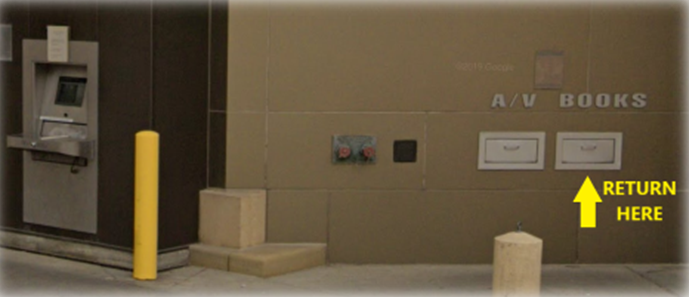
The preferred return method is to hand the item to a staff member at the circulation desk. During closed hours, please return materials through the walk-up book return (the two pull open slots just to the right of the drive-up book return). Please do not return through the drive-up book return with the conveyor belt. Interlibrary loan materials checked out on the Bookmobile may be returned to the bookmobile.
Interlibrary loan materials returned to other libraries will not be removed from your account until they arrive back at RPL.
Are There Overdue Fees Charged?
- Overdue fees are the same as charges for RPL materials (currently fine free).
- If ILL materials are not returned 28 days after the due date, they will be considered lost and a replacement fee will appear on your account.
- Lost or damaged materials borrowed from other libraries will result in a default charge of $50 to your account. Please contact the ILL department to get the actual charge. (The University of Minnesota libraries currently charge $110 for every lost title; other libraries may charge higher or lower amounts.)
- Customers who lose, damage, don’t pick up requested interlibrary loan materials, or return them consistently late, will be denied further interlibrary loan privileges.
- Repeated misuse of the MNLINK system, such as frequent placing of requests for items RPL owns, or placing duplicate requests, will also result in being barred from using MNLINK to make future interlibrary loan requests.
Books For Book Clubs
How do I get books for my book club?
The best way to obtain multiple books for your book club is to reserve a Book Group in a Bag kit.
If you cannot utilize the Book Group in a Bag collection, you may request books through interlibrary loan.
To ensure that each member of your group receives a copy in a timely manner, please follow these guidelines:
- Select a title that is at least a year old and does not have a local waiting list.
- Each book group member requests a copy at www.mnlink.org using their library card. They can choose to have their book delivered to the main library or the bookmobile. (Delivery can take up to two weeks; please plan accordingly.)
- If you are requesting a title that RPL owns, please include a “For a book club” in the notes field to avoid an automatic denial of the request.
Note: Delivery can take up to 2 weeks. ILLs check out for 21 days, and cannot be renewed